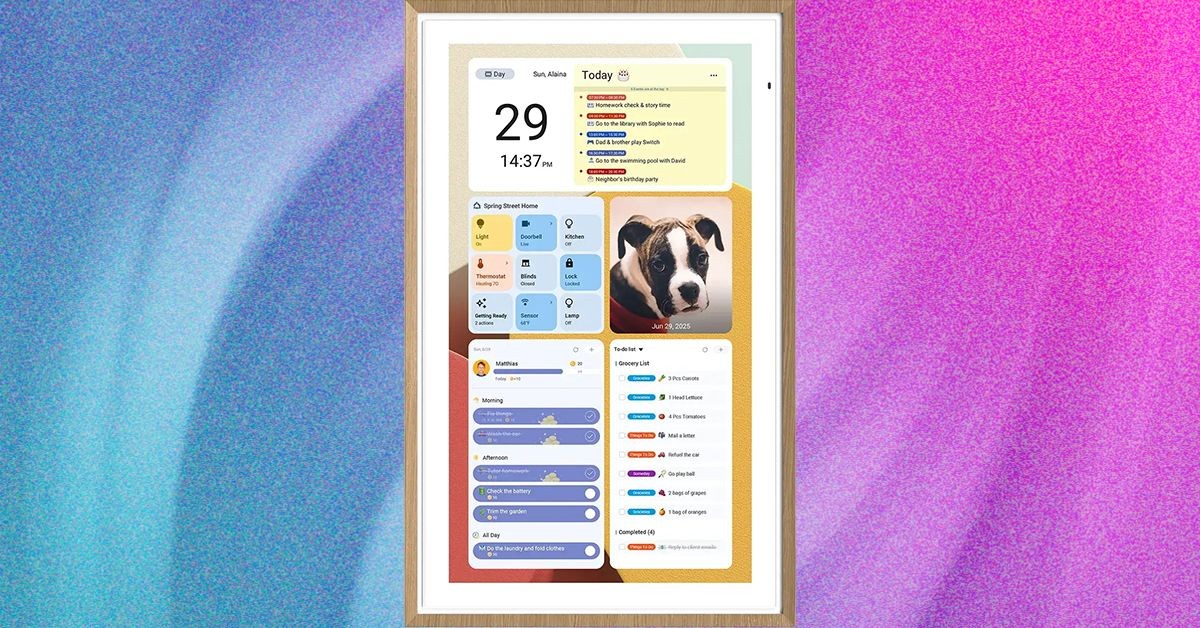
Digital wall calendars have evolved from a niche gadget into a surprisingly useful tool for managing busy households. These devices bridge the gap between digital convenience and the tactile appeal of a traditional family calendar, offering a central hub for schedules, chores, and meal planning. After extensive testing, here’s a breakdown of what you need to know.
What Are Digital Wall Calendars?
These aren’t just fancy digital screens. They connect directly to your existing calendar apps – Google Calendar, Apple Calendar, Microsoft Outlook – and display everything in a clear, wall-mountable format. Unlike smart displays cluttered with AI assistants and notifications, these devices focus on one core function: family organization. The benefit is simple: everyone can see the schedule at a glance, eliminating confusion over conflicting appointments or forgotten events.
Beyond the Schedule: Features You’ll Actually Use
Modern digital wall calendars go beyond basic scheduling. Most include features like:
- Shared To-Do Lists: Assign tasks and track progress, often with rewards systems for children.
- Meal Planning: Plan meals for the week and automatically generate grocery lists.
- Digital Photo Frame: Many models double as a digital photo frame, turning a functional device into a home décor element.
The key is that these features are designed for family management, not individual productivity.
Is a Digital Wall Calendar Worth It?
The answer depends on your household. If you already rely heavily on digital calendars, having a physical representation can be surprisingly impactful. The convenience of glancing at the week’s schedule while in the kitchen or coordinating plans without pulling out phones is real. However, some models lock essential features behind a subscription, which is a major drawback.
The Best Options Available
After testing several models, here’s a breakdown of the top contenders:
Skylight Calendar: The All-Around Champion
Skylight offers three sizes: a 10-inch model, the updated Calendar 2 (the sweet spot at $280), and a premium Calendar Max ($600). The software is intuitive, syncing seamlessly with Google Calendar and other platforms. The standout feature? The Plus subscription ($79/year or $8/month) unlocks meal planning, rewards tracking, and a photo screen saver, making it a worthwhile investment for families who will use these features.
Pros: User-friendly software, clean interface, reliable syncing.
Cons: Key features locked behind a subscription.
Apolosign Digital Calendar: The Subscription-Free Alternative
Apolosign’s Digital Calendar is a solid choice if you want to avoid monthly fees. It runs on Android OS, making it familiar to users of Google Pixel Tablets and other Android smart displays. The interface is functional but less polished than Skylight’s. While syncing with Google Calendar is smooth, iPhone users have reported one-way sync issues.
Pros: No subscription required, competitive pricing (often on sale).
Cons: Less refined software, potential compatibility issues with iPhones.
Other Contenders
- Cozyla Digital Calendar ($350): Similar to Apolosign in terms of Android-based operation, but syncing can be unreliable.
- Hearth Display ($699): Overpriced and feature-bloated. The subscription model is aggressive, and the interface feels clunky.
How Do They Work?
Syncing is straightforward: connect the calendar to your Wi-Fi, link it to your existing digital calendar app, and the device automatically updates. Changes made on your phone or computer will appear on the wall calendar (and vice versa, though some models have syncing limitations).
Smart Display vs. Digital Wall Calendar: What’s the Difference?
Smart displays (like Google Nest Hub or Amazon Echo Show) offer versatility but are often cluttered with unnecessary features. Digital wall calendars prioritize one thing: family organization. You sacrifice smart-home integration and video streaming, but gain a dedicated tool that won’t distract you with notifications or AI assistants.
Final Verdict
Digital wall calendars are a surprisingly effective way to stay organized as a family. If you’re already heavily invested in digital calendars, the Skylight Calendar (with the Plus subscription) is the best overall option. If you prefer to avoid monthly fees, Apolosign offers a solid alternative. The key is to choose a device that fits your needs and commitment to syncing schedules as a team.